Case Study · 01

AI Content Studio

Designing an end-to-end content operation for teams that can't afford a content team

Role

Solo Designer

Timeline

3 Weeks

Company

Birdeye

Content Hub overview
../images/hero-overview.png Replace with product overview screenshot
Context

Birdeye serves multi-location businesses — dental groups, auto dealerships, and franchise chains. The person responsible for social content is usually a front desk manager juggling ten other things. Not a content strategist. Not a social media team.

Content Hub is Birdeye's answer to that gap: an AI-powered platform where a single conversational brief generates an entire campaign — social posts, a blog, a landing page, and customer emails — then routes everything through review, approval, and publishing without leaving the product.


Problem

"I know I need to post, but by the time I sit down to write something, it's already Thursday."

— Regional Marketing Manager, Multi-location dental group

01

Blank canvas paralysis

No starting point. Writing content for Facebook, Instagram, LinkedIn, a blog, and an email — each different — is paralyzing for someone who didn't sign up to be a content team.

02

No brand consistency across locations

Each location manager posted differently — different tones, different visuals, different CTAs. Franchise operators had no visibility and no control over what went out in their name.

03

Approvals happened over text

Drafts lived in Notes apps. Sign-offs happened in iMessage threads. There was no record, no version history, no way for HQ to catch a bad post before it went live across 500 locations.


Who We Designed For
Primary User

Regional Marketing Manager

Oversees 5–20 locations. Not a copywriter. Wants to look good to leadership. Needs content to move fast but can't afford a mistake going live across 10 Facebook pages at once.

  • Overwhelmed by platform-specific formatting
  • Fears anything going wrong publicly
  • No time to coordinate 10 location managers
Secondary User

Business Owner / Franchise Operator

Wants a consistent social presence but has zero time for execution. Will abandon any tool that requires more than three decisions to get started.

  • Can't afford inconsistent brand voice
  • Needs control without micromanaging
  • Wants visibility, not involvement

Process

Week 1

Discovery

  • Customer calls with PM
  • Mapped existing content workflows
  • Competitive analysis — Jasper, Buffer, Hootsuite
  • Defined 5-min benchmark with engineering

Week 2

Design & Prototype

  • Rapid wireframes → internal critique
  • Tested conversational brief vs. form
  • Interactive prototype in Figma Make
  • Tested with real customer via CS team

Week 3

Handoff

  • Worked with ML engineer on AI constraints
  • Designed loading, empty, and error states
  • Full Figma handoff with annotations
  • Edge case documentation with engineering
View Prototype

Key Decisions
01
AI Brief

A guided conversation, not a blank form

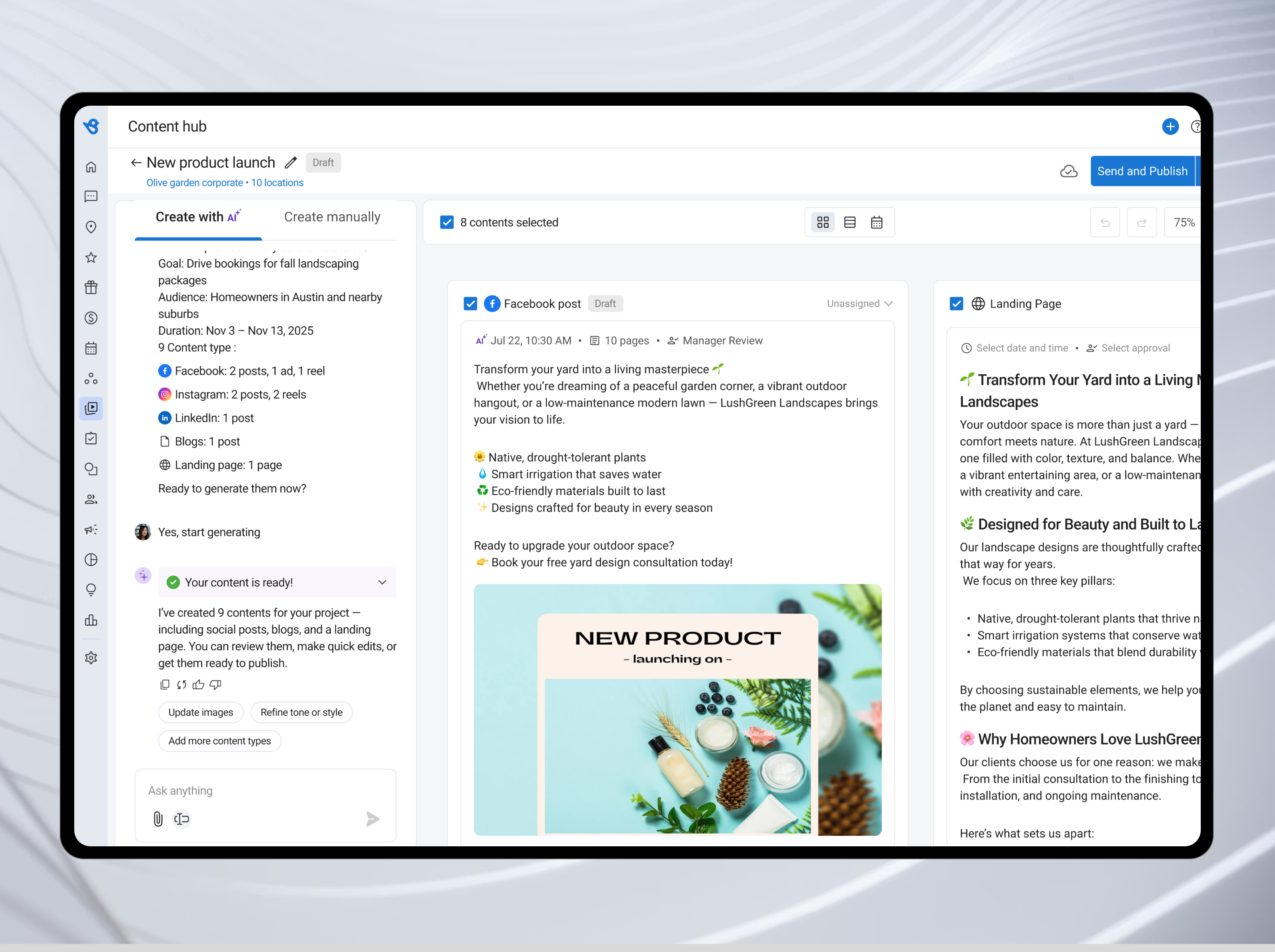
Early explorations gave users a structured form — goal, audience, brief, content types, and dates — all at once. Testing showed this created the same blank canvas problem we were trying to solve. We redesigned the creation flow as a conversational brief: the AI asks one question at a time, offers chips for common goals and audiences, and assembles a structured project summary in the background. The user feels like they're having a quick conversation. The AI feels like it's ready to go to work.

app.birdeye.com · Content Hub — New product launch
AI brief summary card
Tradeoff

Power users wanted to see and edit all fields simultaneously. We kept a "Create manually" tab as an escape hatch — a full structured form for teams that prefer explicit control over the conversational path.

02
Content Canvas

One brief → 9 pieces across 6 content types

Most AI content tools generate one post at a time. We designed the canvas to produce a Facebook post, reel, and ad; Instagram reels; a LinkedIn post; a blog article; a customer email; and a landing page simultaneously from a single brief — each platform-native. The Instagram reel has a countdown timer. The blog has a headline and structured body. The landing page has a hero, services section, and CTA. The user's job shifts entirely from writing to reviewing, assigning, and approving.

app.birdeye.com · Content Hub — New product launch · All locations
Full content canvas
Tradeoff

Generating everything upfront creates review overhead. We addressed this with per-content assignment — each piece can be assigned to a team member with a due date — and an approval queue that surfaces everything pending sign-off across all projects in one filtered view.

03
Approval & Review

Inline comments replace approval-by-text

Before Content Hub, approvals happened over text messages. Feedback was lost, context was missing, and there was no record of what changed or why. We designed a per-content comment thread — attached directly to the piece, visible to everyone on the project. Each comment shows the author's name and which location they're commenting from, which matters when a franchise spans 10 cities. Configurable approval workflows formalize the final sign-off, with six preset types from "Manager Review" to "Multi-step Approval" — each toggled per campaign, not per post.

app.birdeye.com · Content Hub — Notes · Facebook post
Per-content Notes panel
Tradeoff

Some managers preferred a simple Approve / Reject action without a discussion layer. The approval queue serves them — one row per piece, bulk-approve in a click — with the comment thread underneath for teams that need richer async collaboration.

04
Publishing

Calendar closes the loop — AI picks the time

Content without a publishing plan is just drafts. The calendar view shows the full publishing picture at a glance — what's scheduled, in draft, and published — across all locations and platforms in one week or month view. For social posts, BirdAI pre-fills the scheduling modal with the optimal publish time based on past engagement data per channel. Teams can override it; most don't. Making calendar one of three equal views — alongside Grid and List — meant teams discovered it when they needed it, without it feeling mandatory.

app.birdeye.com · Content Hub — Calendar · December 2025
Calendar week view
Tradeoff

Calendar feels like overhead for single-location teams running one campaign at a time. Making it an optional view — not the default — kept smaller teams in the grid while multi-location operators got the publishing visibility they actually needed.


Also Shipped

These six features weren't in the original scope. They emerged from post-launch customer feedback and sessions with the CS team — patterns that kept surfacing about accountability, visibility, and team control.

Version History

Every edit to a piece is tracked by name, timestamp, and action — caption updated, image replaced, post published. Teams can restore any prior version with one click.

Share & Access Control

Projects can be shared via link with location-scoped access — keeping franchise content within the right teams.

Activity Log

A project-level audit trail shows who created, generated, shared, and published content — and when.

Content Library

A library of AI-recommended and user-saved project templates organized by goal so teams can start from intent, not a blank canvas.

Export

Social posts export as ZIP. Blogs and landing pages export as HTML.

Assigned to Me

A dedicated queue shows only the pieces assigned to you, with due dates, campaign context, and Open / Closed task states.


Outcomes

10K+

Business locations using Content Hub at launch

9

Content pieces generated from a single brief across 6 types

< 2min

Average content creation time post-launch

Content Hub became one of Birdeye's most adopted AI features at launch. Businesses that previously posted once or twice a month increased publishing frequency significantly. The approval system reduced back-and-forth outside the platform, and the calendar view gave franchise operators the visibility they asked for.


Reflection

If I had more time, I'd have pushed harder on brand templates — a library of pre-approved voice and tone guardrails businesses could lock AI-generated content into. The pure AI approach worked well for confident users, but brand-sensitive clients wanted controls that went beyond the approval workflow.

Version history and the activity log were late additions that arrived after initial launch based on customer feedback. They should have been in the first release. Teams collaborating across 10 locations need a reliable audit trail from day one.

The "Assigned to Me" view also surprised us post-launch. Designing for the individual within a team — not just the team as a whole — is a pattern I'd carry into any future collaboration product.